
Content releases
Group approved pages into a named release and publish them together at a scheduled time. Keep writing your next draft without changing what is going live.
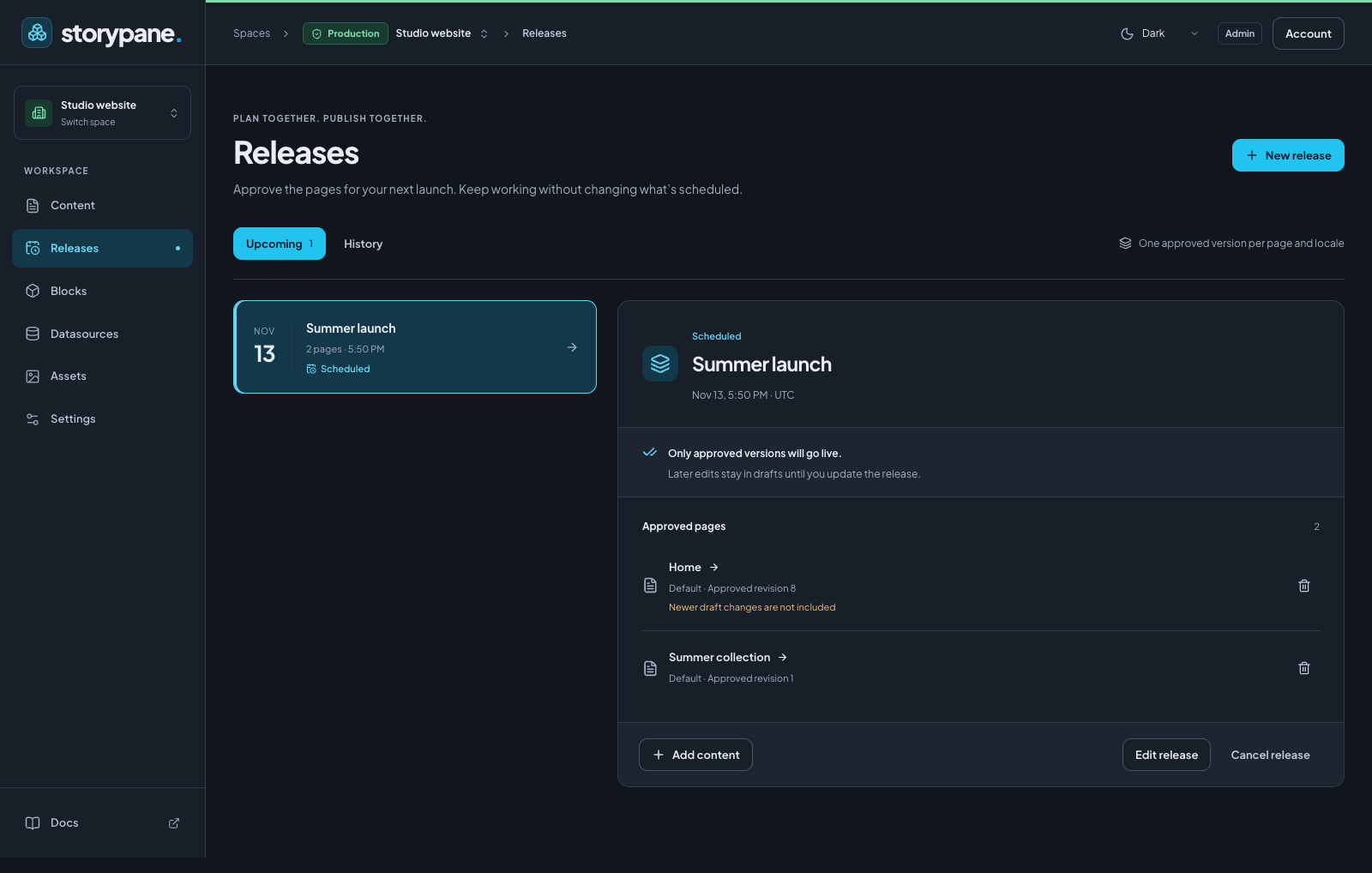
How releases work
- A page locale can belong to one upcoming release. Different locales can have different releases. A space can have several releases.
- Each member pins an approved saved revision, including the complete nested block tree. Autosaving later edits does not change that approval.
- All members share the release’s date, time and timezone. A release can contain up to 100 page locales.
- At publication time, Storypane checks permissions, schema compatibility and content validity again. It publishes every member in one database transaction. If one fails, none of that attempt goes live.
Releases belong to a single space. They are separate from schema migrations and are not cloned, synced or promoted between development and production spaces. Keep production’s Schema read-only protection enabled: content releases do not need schema editing access.
Schedule a page
- Open the page and locale in Content. Wait for All changes saved.
- Choose Review & publish. Check the saved content, URL, validation results, and linked-page choices.
- Choose Add to release.
- Select Create a new release, enter a clear name such as
Summer launch, then choose the Release date and time and Timezone. Use an IANA zone such asAmerica/VancouverorUTC. - Choose Create release & schedule. The editor shows the release name, scheduled time and approved revision, with a View release link.
Alternatively, select an existing release and choose Add to release. Its time applies to this page too. When a clock change repeats a local time, choose the intended UTC offset; skipped times cannot be scheduled.
Plan a release first
Open Releases in the left menu and choose New release. Name it and set its time. Choose Add content, open a page, and follow the publishing review above. The selected release is offered in the page’s release picker.
The Upcoming view shows scheduled releases and those needing attention. Select a release to see its approved pages, locales and revisions. Newer draft changes are not included means the current saved draft differs from the approved version. An empty release does not publish anything.
Edit a page that is already scheduled
Autosave continues normally. When you review the next saved version, choose:
| Action | Result |
|---|---|
| Update release | Replace the approved version with the revision you just reviewed; retain the release time. |
| Publish now & remove from release | Publish the reviewed version immediately and remove this page locale from its upcoming release. Other members remain scheduled. |
| Close the review | Keep the new draft; the previously approved version remains scheduled. |
To move a page, choose Update release, select a different release or create a new one, and confirm Move to release. The form names the source release. Moving a page does not move other members automatically. Bulk publishing directs you to the editor for scheduled pages so you can make this choice explicitly.
If someone changes a release or the page’s scheduled version while your review is open, refresh and review again. Storypane rejects stale approvals instead of silently replacing someone else’s changes.
Nested blocks and linked pages
Nested blocks are part of the page’s approved snapshot, including their field values, order and structure. Later edits to a nested block stay in the draft.
Linked pages are separate content. The publishing review lets you approve selected linked pages for publication alongside the main page; those approved pages become members of the same release. References you choose to omit are omitted from the approved publication, without deleting them from the draft. Already published references can continue using their live content.
A linked page already scheduled in another release must be moved explicitly before including it. Publishing a page immediately cannot silently publish a linked page that belongs to a release. If a required linked approval is removed, changed, or independently published with a different revision, the release needs another review before it can go live.
Reschedule, remove or cancel
- Edit release changes its name or shared publication time. It keeps the approved revisions; it does not pull in newer drafts.
- Use a page row’s Remove from release action to remove only that member. Review any other members that depended on publishing it.
- Cancel release cancels the whole group after confirmation. Current live content and drafts remain unchanged.
- History contains published and cancelled releases.
Reading a release requires access to all its page locales. Managing the whole release requires publishing access to every member. A page can still be managed through its own authorized publishing controls.
When a release needs attention
A permission change, schema migration, invalid content or changed linked approval can put the release on hold. The release keeps its page memberships and explains why it stopped. No pages from the failed attempt are published.
- Open the release and read the error.
- Resolve the problem. After a schema change, review and Update release for each affected page. If an approver lost access, an authorized publisher must approve their pages again.
- Choose Review & resume, select a future time and save. Updating approvals alone does not resume a held release.
Temporary infrastructure failures retry the entire release after 1, 5, 15 and 60 minutes, then hold it after five failed attempts. The application checks due releases at startup and every minute, so publication is not exact to the second. The CMS must be running; an overdue release is checked when it comes back online.
Legacy schedules are retained as individual releases during upgrade. Old failed schedules appear under Needs attention; resume them only after review. A newer active schedule for the same page takes precedence until you explicitly resolve its membership.
Websites and automation
The delivery SDK continues to return published content. No frontend contract
changes are needed: client.listAllStories() still reads the default locale when
options are omitted. Static websites must rebuild, and cached websites may need
revalidation after publication.
A successful release creates the existing story.published webhook events for
its pages in the same transaction. These arrive as separate deliveries; coalesce
build requests when several pages go live together. There is no release-level
webhook event. See webhooks.
Use the management API for release creation,
rescheduling and cancellation, and the existing scheduling endpoint to approve
members. Always carry the reviewed revisions and reuse a request ID only for an
identical retry. The SDK management client
can call these endpoints through request().