
Storypane architecture
Storypane has three main parts: a Node application, PostgreSQL databases, and private S3-compatible file storage. Your public website is a separate application that reads published content through the Storypane SDK or delivery API.
The combined Node application serves the React editor, authenticated APIs, live
collaboration, and background jobs. A STORYPANE_SERVICE=delivery process serves
published content and authorized media independently, reusing the same databases
and private storage. It has no rooms or schedulers. Both services support
independent replicas. The Railway template provisions both; the local Docker
setup keeps the combined application by default. See
separate delivery deployment.
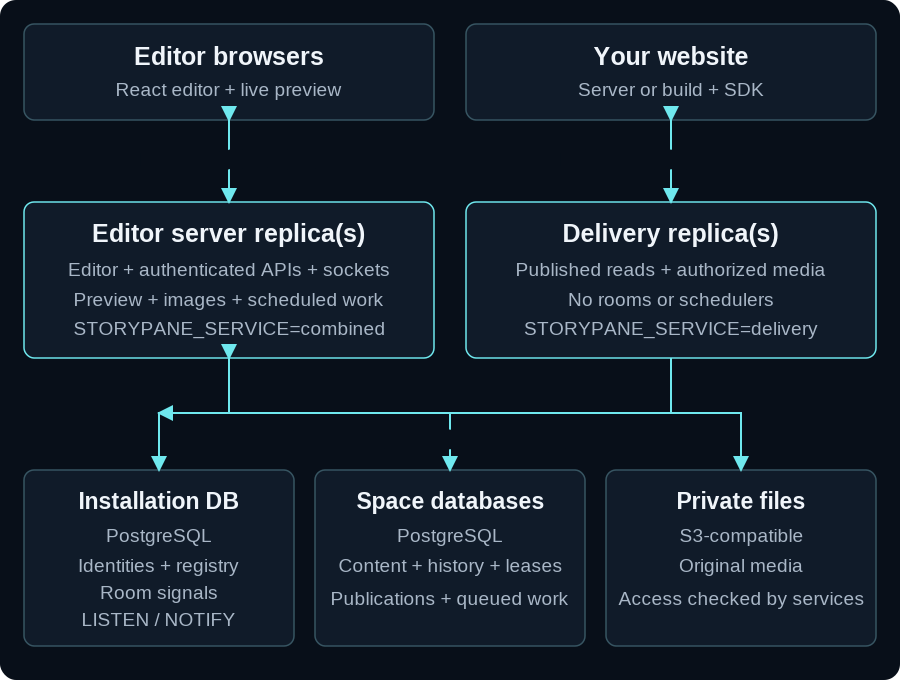
What runs where
| Part | Responsibility |
|---|---|
| Editor in the browser | Shows stories, block fields, media, reviews, and your website’s live preview. Sends edits to the CMS. |
| Node application | Serves the editor and HTTP APIs, checks access, manages collaboration sockets, processes images, and runs scheduled work. |
| Installation database | Holds installation identities, local authentication records, administrator privileges, and the registry of space database connections. |
| Space databases | Each space stores its schemas, content, memberships, roles, history, publications, asset metadata, and queued work in its own PostgreSQL database. |
| Private object storage | Holds uploaded original files. The CMS controls access and produces resized or compressed images. |
| Your website | Uses your components and routing to turn published content into pages, at build time or when a visitor requests them. |
The databases can share one PostgreSQL server. A database per space does not require a separate server per space. Operators can also attach databases on other PostgreSQL hosts. The bundled Docker setup runs the app, PostgreSQL, and MinIO; the Railway template provisions editor and delivery services, PostgreSQL, and a private bucket.
A space is a data boundary
An installation is the CMS you deploy. A space is an independent content workspace inside it, with its own database and dedicated database credentials.
After checking the user’s session, the application resolves the requested space through the installation registry and connects to that space’s database. Connection credentials are encrypted in the registry. Space membership, roles, and content scopes determine what the user can read, edit, review, or publish.
Built-in Better Auth sign-in is the default. Optional Clerk or a custom server authentication adapter establishes identity; Storypane still enforces installation privileges and space permissions. See authentication and database isolation and hosting.
How content is stored
Within a space database, PostgreSQL stores the content’s structure in relational columns and its flexible field values in JSONB. A new content field is represented in a versioned block schema and the block’s JSONB values. CMS database migrations manage the underlying SQL tables separately from these content-schema changes.
| Table | What it stores |
|---|---|
definitions |
A block type’s stable identity and name, such as page or hero. |
definition_versions |
Versioned block schemas in the schema JSONB column: fields, types, defaults, and restrictions. |
stories |
Page identity and organization, including its name, space, and path. |
story_locales |
One locale of a story, its URL, root block, revision, and pointers to the current saved checkpoint and publication. |
block_drafts |
One row per current draft block. Relational columns identify its locale, schema version, parent, field, order, and revision. fields is JSONB. |
checkpoints |
Saved history: an editor snapshot and assembled page content, both JSONB, plus the actor, revision, and time. |
publications |
Published versions, each tied to a checkpoint, with its own JSONB snapshot and assembled content. |
assets |
File metadata and object-storage keys. Original file bytes live in private object storage. |
A page and its nested blocks
For a Home page with one Hero in its body, the draft rows look like this.
All rows belong to the same locale_id; the labels below stand in for UUIDs.
id |
schema_version_id |
parent_id |
parent_field |
position |
fields (JSONB) |
|---|---|---|---|---|---|
page-1 |
page-schema-1 |
NULL |
NULL |
0 |
{"title":"Home"} |
hero-1 |
hero-schema-3 |
page-1 |
body |
0 |
{"title":"Hello"} |
The Hero’s parent_id points to the Page block, parent_field puts it in body,
and position orders it among siblings. Deeper nesting uses the same structure.
Each block points to the exact definition_versions row used to interpret and
validate its fields. Reusable block definitions describe types; each block instance
has its own ID and values.
The application assembles these rows into the nested JSON your components expect:
{
  "_uid": "page-1",
  "component": "page",
  "title": "Home",
  "body": [
    {
      "_uid": "hero-1",
      "component": "hero",
      "title": "Hello"
    }
  ]
}
_uid comes from the block ID; component comes from its definition name. The
body array is assembled from child rows. It is not the editing representation
stored in the parent block’s fields column.
Saved drafts and publications
A saved edit updates the draft rows, increments revisions, and writes a checkpoint
within a database transaction. story_locales.checkpoint_id identifies the current
saved state. Checkpoints currently retain full snapshots per autosave batch, so
history storage grows with page size and save frequency.
Issue #3 tracks benchmarking storage growth and save latency with large pages and concurrent editors, then evaluating opt-in retention. The proposal keeps recent history and checkpoints required by current drafts, publications, and schedules/releases. Cleanup must preserve safe mutation retries before it can be enabled; no checkpoint retention setting or automatic cleanup is currently implemented.
Normal draft preview reads that checkpoint’s assembled content. Publishing
records the reviewed content in publications and advances
story_locales.published_version_id. Published delivery reads that publication’s
content, while editors can continue changing draft rows and creating new
checkpoints. The two pointers let the latest saved draft and the live page differ.
From editing to a published page
- Define the structure. Developers create content types and reusable blocks. A page has a root block and nested blocks; fields describe text, media, links, and other content. Each locale has its own content and publication.
- Edit and save. The editor sends changes to the CMS. The server checks permissions, validates fields and revisions, and commits changes to PostgreSQL. A block lease is a temporary editing lock that prevents conflicting edits to the same block while teammates work on other blocks.
- Share live updates. WebSocket rooms distribute presence and saved changes to editors and authenticated previews. Responses are filtered for each recipient’s permissions. PostgreSQL holds the durable state; the room’s in-memory connections are recreated after a restart.
- Review and publish. Publication selects a saved checkpoint, checks required approvals and linked content, and records the published version transactionally. Later draft edits remain separate. A content release can schedule approved page revisions to publish together.
- Render your website. Your server or build uses a published-content token to fetch JSON through the SDK or delivery API. Your components render it. Static sites rebuild or revalidate when content changes; request-rendered sites fetch it as needed. Keep delivery and management credentials on the server.
Start with the editor quickstart, then follow the SDK, Astro, or Next.js integration guide.
How live preview works
The preview is your actual frontend running inside an iframe in the editor. You
configure its URL in Settings → API & preview. Your preview route loads your
components and styles, and connects using connectPreview or the SDK’s React hook.
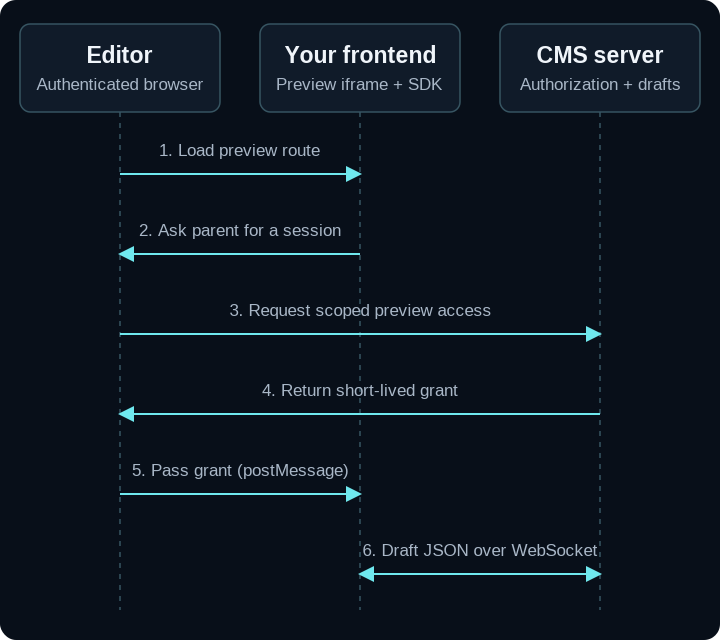
- Load your frontend. The editor opens the configured preview URL for the selected story and locale. A preview-mode signal activates the SDK integration.
- Request access through the editor. The iframe SDK asks its parent for a
session using
postMessage. Both sides check the exact origin and source window. The editor requests a grant through its authenticated CMS session. - Issue a scoped grant. The CMS creates a five-minute, read-only preview session bound to the space, story, locale, and configured frontend origin. The editor passes the grant to the iframe, and the SDK renews it while authorized.
- Read saved drafts over WebSocket. The iframe connects to the CMS at
/api/preview/live. The server checks the grant and reads the latest saved checkpoint’s assembled JSON. After edits are saved, the collaboration room sends updated authorized content to the preview. - Render and select blocks. Your frontend renders the received JSON with its
own components. Elements marked with
data-storypane-idcan send block selections back to the editor. Selecting a block in the editor can highlight its matching element in the preview.
This path renders saved changes after autosave commits; input still waiting in an editor buffer is outside the normal page-preview stream. Your preview route needs client rendering or DOM updates to display incoming changes. Static server-rendered HTML alone does not redraw when the SDK receives new JSON.
Preview grant hashes and scope are stored in the space database’s
preview_sessions table. The installation database’s preview_routes table maps
the token hash to the space so a connection reaches the right database. Preview
sockets accept sync and heartbeat requests, and do not acquire editing leases.
Session expiry, revoked access, and membership changes are rechecked during delivery.
Long-lived delivery, management, and server preview credentials stay on the server.
The iframe receives only its short-lived grant, without putting it in the preview
URL or relying on third-party CMS cookies. For a preview outside the CMS iframe,
your authenticated app server can supply a grant through getSession; see
standalone preview and authorization.
Block hover previews reuse this connection and your component renderer. Existing
blocks use saved content; the Add block picker can render schema defaults before
insertion. Release previews use the approved release snapshot, so later draft
changes stay outside that view. Ordinary published-content delivery continues
reading publications, independently of preview.
Schemas and team environments
The recommended setup is one production space for editors and a linked development space per developer. These are separate content databases within the same installation.
Developers change schemas in their dev spaces, review migrations, and promote deployed changes to production. Schema promotion applies reviewed structural changes to production content; it does not copy a developer’s content or publish drafts. Other developers explicitly sync from production before promoting their work. See production and development spaces.
Media, automation, and scheduled work
Asset metadata lives in the space database; original bytes live in private object storage under space-specific keys. The Node app handles uploads, access checks, image resizing, and compression. Public delivery of published media is an explicit option, and an edge image CDN can be configured separately. The bucket stays private.
Scripts and agents use the management API with scoped credentials. The SDK’s management client, CLI, and stdio MCP adapter call that API and follow the same authorization and publishing rules. See agents and automation.
Publication and webhook delivery have independent minute schedulers in the Node process. Scheduled publications and webhook work are persisted in PostgreSQL; webhooks use a transactional outbox and retry failed deliveries. A webhook can trigger your site’s rebuild or another integration. See content releases and webhooks.
Deployment and scaling
Combined/editor replicas share room notifications through PostgreSQL LISTEN/NOTIFY.
Sockets remain local; signals contain room identifiers, and each process rereads
state and authorizes its own recipients. Reconnecting listeners refresh active
rooms; heartbeat synchronization covers missed signals. PostgreSQL remains
authoritative for content, leases, sessions, schedules, and webhook claims.
Start with one replica per service. Here a replica is a server process, not a person using the editor. PostgreSQL notifications currently have no measured capacity limit for this application. The 113-connection estimate for two editor replicas plus one delivery replica is a sum of configured pool ceilings, not observed usage or a notification limit. It does not show that two replicas will overload Postgres.
The next capacity check compares one and two editor replicas while delivery stays online, with increasing editor join bursts, saves, preview updates, and SDK reads. Record actual connections, SQL latency, notification queue usage, update delay, errors, CPU, and memory. Repeat listener interruption and process replacement.
See the capacity test plan for the workload, measurements, and acceptance evidence still needed. Before adding production replicas, follow the shared configuration, readiness, and connection-budget requirements. Keep the app running for live collaboration and scheduled work. Your public website can use its own hosting and caching strategy independently.
Published delivery can run as a separate STORYPANE_SERVICE=delivery service and
scale independently against the same databases and private storage. It serves
published stories, locales and authorized media, without editor, preview or
WebSocket routes or background schedulers. Keep preview and schema tooling on the
editor origin. Database capacity and connection budgets still apply; see the
delivery deployment guide.
Back up the installation database, every space database, original media, configuration, and encryption keys together. A database-only backup cannot restore the complete installation. Follow the backup and upgrade guide.
storypane.dev is a separate static Astro marketing and documentation site, hosted
on Cloudflare Workers Static Assets. It is independent of a self-hosted CMS
installation. The CMS runs on Node/Docker; your own public website can use the
hosting and framework you choose.
Where the code lives
These are code packages within one repository and Docker image. The local default is one combined application; the Railway template separates editor and delivery.
| Directory | Responsibility |
|---|---|
apps/web |
React editor, authentication boundary, HTTP routes, and Node server. |
apps/realtime |
Collaboration rooms, WebSocket messages, and recipient filtering. |
packages/core |
Shared content contracts and validation. |
packages/db |
Database transactions, permissions, migrations, history, and publishing. |
packages/assets |
Uploads, asset access, and media delivery. |
packages/runtime-node |
Node adapters for object storage, images, rooms, and scheduling. |
packages/sdk |
Website delivery and preview clients, management client, CLI, and MCP adapter. |
packages/ui |
Shared editor controls. |
apps/example-astro, apps/example-next |
Separate example websites that integrate with the CMS. |
For installation instructions, continue with local setup, Railway, or self-hosting.