
SEO & AI metadata
The SEO & AI preset creates an ordinary nestable seo block with standard
fields. Your frontend uses it for search metadata, social cards, and optional
Markdown mirrors of published pages. There is no plugin, new field type, or
runtime dependency. The preset is available in current source builds.
Add it to a page
- In your development space, open Blocks → New block → Config and select Use SEO & AI preset before editing the empty definition.
- Review the fields and choose Create block. If
seoalready exists, reuse or extend it instead of creating a duplicate. - Edit your Page definition. Add a Blocks field with technical name
seo, label SEO & AI, maximum 1, and allow only theseodefinition. Keep it separate from the visiblebodyfield. - Review and deploy the schema migration in dev, then promote it to production. Pull the deployed schema and regenerate your application’s types.
- Add one SEO block to a page, set its values, and publish the approved changes. Rebuild your static website to update metadata and mirrors.
Creating the preset only stages a schema change. It does not change your site’s HTML, create public routes, or publish content. Existing metadata schemas can keep their names and additional fields.
Fields
All fields are optional; the examples use the following defaults and fallbacks.
| Field | Editor control | Website behavior |
|---|---|---|
title |
Text | Overrides the page title in metadata and the mirror heading. |
description |
Textarea | Search/social description and mirror introduction. |
canonical_url |
Text | Absolute HTTP(S) canonical URL; falls back to the page URL. |
og_image |
Image asset | Open Graph and Twitter image, including the asset’s alt text. |
robots_index |
Single option | index by default; noindex also excludes Markdown output. |
robots_follow |
Single option | follow by default; can be nofollow. |
markdown_enabled |
Boolean | false by default. Explicitly enable a published page’s mirror. |
The preset intentionally shares title and description across search and social cards. Add separate overrides using ordinary fields if your site needs them.
Frontend integration
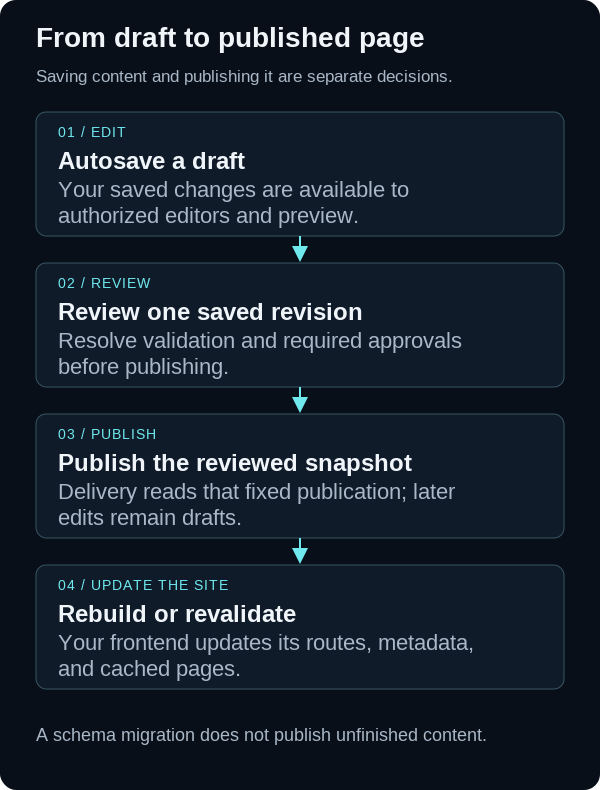
The Astro and
Next.js examples implement
the complete flow. Set SITE_URL to your public website origin for production
builds; it is separate from the Storypane API URL.
Both examples read page.seo[0] on the server, render title, description,
canonical, robots, Open Graph, and Twitter metadata, and advertise an enabled
mirror with <link rel="alternate" type="text/markdown">. A page at /fr/home
gets a mirror at /llms/fr/home.md; /llms.txt lists enabled mirrors.
Mirrors and discovery use the published delivery client. Missing or false
markdown_enabled, noindex, unpublished stories, and non-page content types
are excluded. Changing a draft does not alter public output. Publish the change
and rebuild to add or remove an existing static mirror.
Each example’s src/lib/seo.ts serializes known visible body fields and plain
rich-text content. Extend that switch when adding visible components; it does
not dump arbitrary CMS fields, internal notes, or referenced stories. Metadata
blocks render no body markup. Tokens stay on the server, and the authenticated
preview route remains separate.
Markdown responses use text/markdown, with a canonical URL in the document.
The route handlers also set a canonical Link header; configure MIME types and
headers on static hosting if it does not preserve response headers. Deploy a
complete fresh build so removed mirrors do not remain on the host.
AI indexing
Markdown mirrors and llms.txt are optional alternative representations and
discovery aids. They do not guarantee inclusion or ranking in search or AI
answers. Google documents that its AI search features require no special AI
file or new schema: Google AI features guidance.
Keep crawler policy in your site’s robots.txt and hosting configuration.
Search discovery and model-training crawlers can have different controls; see
OpenAI’s crawler documentation.
The block does not configure those policies or generate structured data unrelated
to the page’s visible content.